
|
TradeScan |

|
| day trading alerts for the professional trader | ||
| Benefits of Using TradeScan |
|
 |
|
|
|
TradeScan |
|
| day trading alerts for the professional trader | ||
| Benefits of Using TradeScan |
|
|
|
|
As professional day traders, we have to constantly stay at the top of our game in order to be successful. That means continually searching for ways to minimize any disadvantages we may have in the market. While we can do this in a number of ways, here are some of the ways TradeScanTM can assist us, as traders, toward this goal:
|
|
TradeScanTM, with it's vast array of proprietary filters, helps the trader focus on the more "trader friendly" stock movements. |
|
|
TradeScanTM continually scans the market for stocks on the move and alerts the trader, thus eliminating the need for large numbers of level 2 windows on the trading desktop in order to catch early moves. |
|
|
TradeScanTM spots unusual activity in stocks even out of the trader mainstream, thus allowing the trader to "trade away" from the day trader stampede where moves can sometimes be more predictable and less volatile. |
|
|
TradeScanTM allows the trader to diversify his day trading by augmenting the stock subset with stocks not normally traded. |
|
|
TradeScanTM can increase trader efficiency by helping the trader identify the more advantageous segments of the day for trading a particular issue. |
|
|
TradeScanTM helps expand the trader's effective day by scanning for moves of a particular stock even during a typically slow time in the trading day when order flow may be processed, thus alerting the trader of potential opportunity sometimes missed by "snoozing" traders. |
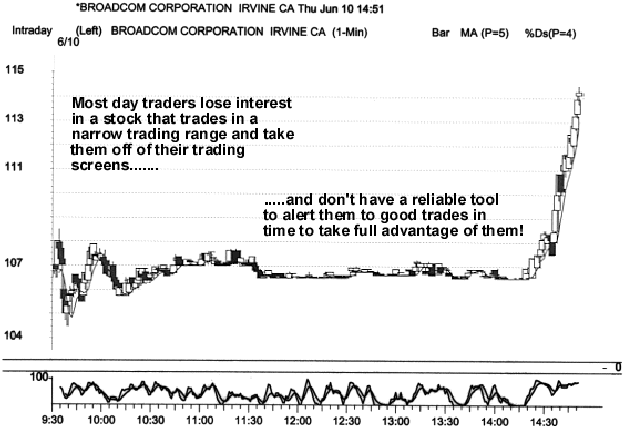
Here is an illustrative example of a TradeScanTM early alert on June 10th, when Broadcom ran over 7 points in less than 30 minutes during an otherwise slow trading session. Many traders, that did not have an early alert trading tool, were caught off guard and unable to participate fully in the move because of the difficulty of getting filled in a stock that is already moving.
Features of TradeScanTM Alert Windows
The latest version of the alert window has the following new features:
|
|
Fully sizeable and moveable on the Windows desktop to integrate transparently with traders' current trading screens. |
|
|
"Always on Top" and "Pop Up" options to allow trader control over the behavior of the alert window on the desktop. |
|
|
User definable stock list featuring "List Only " and "Exclude List " options to accommodate specific trading styles. |
|
|
Color options for "Good ", "Bad " and "Neutral " alerts as well as background color. |
****First time users please read our disclaimer****
Pursuant to the Investment Advisers Act of 1940, it should not be assumed that recommendations made in the future will be profitable or will equal the performance of the securities in the examples.
About Us | Day Trading Software | FAQ | TradeScan Chat Room | Our Trading Room | Traders' Daily Reconciliation Forms | Most Popular Day Trader Stocks | Trading Tips | Traders Tax Tips | Day Traders and the Media | Links
© Copyright 1998 - 2026 Kingsbury Financial Management, Inc. All rights reserved.
"TRADER'S PARADISE" and "TRADESCAN" are trademarks of Kingsbury Financial Managment, Inc.